Category: Uncategorized

AI Enabled Economy ?

AI-Enabled Economy: A New Era of Possibilities

The AI-enabled economy is not just an add-on or a luxury—it represents a fundamental shift in how businesses operate. AI is no longer just an enhancement; it is becoming an integral part of business strategy, decision-making, and execution.

At its core, AI can:
Create comprehensive business strategies from scratch.
Analyze entire books, documents, and reports to generate summaries and actionable insights.
Deliver personalized, interactive experiences, unlocking unprecedented opportunities for enterprises.

RAG & AI’s Expanding Capabilities

With Retrieval-Augmented Generation (RAG), AI is no longer limited to pre-trained knowledge—it can:
* Interact with external data systems in real time.
* Process and analyze not just text, but also images, videos, and multimedia content.
* Go beyond retrieving information—it can generate, customize, and adapt content dynamically.

As Jensen Huang (NVIDIA CEO) stated, AI is not just about accessing knowledge; it’s about creating and transforming information, making it more dynamic, interactive, and personalized than ever before.

The Rise of Self-Learning AI Entities

AI models are evolving into autonomous digital entities capable of continuous learning and self-improvement.
MemGPT has taken LLM capabilities to the next level by allowing AI to retain and enhance its knowledge over time.
Reinforcement Learning is pushing the boundaries of AI by enabling models to improve themselves based on real-world usage. AI-powered code optimization is already enhancing platforms like OpenAI Codex, allowing them to self-improve with minimal human intervention.

The AI-enabled economy is reshaping industries, enhancing productivity, and driving innovation. As AI continues to evolve, businesses that embrace and integrate AI strategically will be at the forefront of this revolutionary transformation.

For the past 60 years, technology has been evolving rapidly, but the biggest breakthrough yet is AI. Unlike previous advancements that were limited to pre-trained content and static datasets, AI—powered by innovations like MemGPT and Reinforcement Learning—is now breaking past traditional boundaries, enabling self-learning and autonomous digital entities.

Technology Evolution Over the Decades:

1960sSemiconductors laid the foundation for modern computing.
1970sOperating systems revolutionized software interaction.
1980sNetworking enabled global connectivity.
1990sInternet infrastructure built the backbone of the digital world.
2000sInternet services transformed commerce and communication.
2010sMobile services reshaped accessibility and user experience.
2020sOpenAI & Generative AI unlocked next-level automation and intelligence.

AI: The Next Great Leap in Technology

OpenAI is delivering unimaginable capabilities across industries, including:

Customer service – AI-powered chatbots enhancing user experience.
Healthcare – AI-assisted diagnostics and personalized treatments.
Finance – Predictive analytics, fraud detection, and risk management.
Education – Personalized learning and automated tutoring.

Today, these industries collectively contribute to a $15 trillion global economy, yet AI has barely scratched the surface. This is where AI will make significant strides, transforming the way businesses operate and innovate.

One of the use case example of Klarana in customer Service

Results achieved by incorporating AI:

  • It handles 2.3 million conversations, two-thirds of Klarna’s customer service chats
  • It is doing the equivalent work of 700 full-time agents
  • It is on par with human agents in regard to customer satisfaction score
  • It is more accurate, leading to a 25% drop in repeat inquiries
  • It resolves customer errands in less than 2 mins compared to 11 mins previously
  • It is available in 23 markets, 24/7 and communicates in more than 35 languages

It has generated an estimated $40 million USD in profitin 2024

Time to Adopt & Lead the AI Era

AI is no longer just an option—it is a necessity for staying competitive. However, as we embrace AI’s potential, we must ensure its responsible and ethical use, balancing innovation with accountability.

The question is no longer “if” AI will shape the future, but “how” we choose to lead in this transformation. Now is the time to adopt, innovate, and take charge of the AI revolution!
Profile based Deployment using Maven In AEM (CQ5)

This presume Maven skeleton has been already created.

  • UI
  • Bundle
  • root pom.xml files.

Update/create  this entries specific to your environment in root pom.xml

Step 1.

<properties>
<project.build.sourceEncoding>UTF-8</project.build.sourceEncoding>
<project.reporting.outputEncoding>UTF-8</project.reporting.outputEncoding>
<!– Development/Integration Server properties –>
<!– Author –>
<cq.devint.author.host>10.29.136.192</cq.devint.author.host>
<cq.devint.author.port>4502</cq.devint.author.port>
<cq.devint.author.username>admin</cq.devint.author.username>
<cq.devint.author.password>admin</cq.devint.author.password>
<!– Publish –>
<cq.devint.publish.host>10.29.136.194</cq.devint.publish.host>
<cq.devint.publish.port>4503</cq.devint.publish.port>
<cq.devint.publish.username>admin</cq.devint.publish.username>
<cq.devint.publish.password>admin</cq.devint.publish.password>
</properties>

Step2 .

Create below profile entry in same pom.xml or where ever you want.

<profile>
<id>dev-int</id>
<build>
<plugins>
<plugin>
<groupId>com.day.jcr.vault</groupId>
<artifactId>maven-vault-plugin</artifactId>
<configuration>
<failOnError>true</failOnError>
</configuration>
<executions>
<execution>
<id>install-package-author</id>
<goals>
<goal>install</goal>
</goals>
<configuration>
<packageFile>${project.build.directory}/${project.build.finalName}.zip</packageFile>
<targetURL>http://${cq.devint.author.host}:${cq.devint.author.port}/crx/packmgr/service.jsp</targetURL>
<userId>${cq.devint.author.username}</userId>
<password>${cq.devint.author.password}</password>
</configuration>
</execution>
<execution>
<id>install-package-publish</id>
<goals>
<goal>install</goal>
</goals>
<configuration>
<packageFile>${project.build.directory}/${project.build.finalName}.zip</packageFile>
<targetURL>http://${cq.devint.publish.host}:${cq.devint.publish.port}/crx/packmgr/service.jsp</targetURL>
<userId>${cq.devint.publish.username}</userId>
<password>${cq.devint.publish.password}</password>
</configuration>
</execution>
</executions>
</plugin>
</plugins>
</build>
</profile>

and finally run this command from command line or any CI Server profile.

mvn clean install -P dev-int

AEM 5.6.1 with Dispacther on IIS 7 Content not displayed

I came across a very unique problem today during one of my production deployment.

IIS with dispatcher on Windows Server and AEM 5.6.1

All Set up and networks good, however when hitting some CQ5 page on web server URL, not showing correct content/synced up content.

  1. Dispatcher.any, Logs, publish agent , Flush agent, accessed  URL directly on browser.
  2. then finally realized DefaultAppPool setting is needed to be increased for this problem to be resolved and it worked.

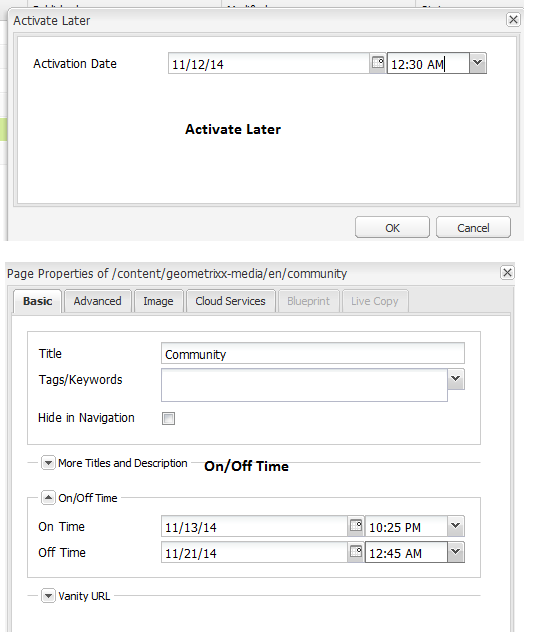
AEM/CQ5 On/Off Time vs Activate Later On Content and Understanding

Activate later and On-Off Time of Content are two different behavior in CQ5/AEM 6. When you apply activate later on any content , that content gets activated at given time and exist in publish instance until it is deactivated or deleted.
On-Off time is little different . It adds additional attribute as properties to the content but it does not activate content. To make it available on publish, it has to be activated. The On and Off Time gets applied on publish site. When Off time matches or greater than current time , CQ5 OSGI Services consider that content as dead and if you try to access using HTTP, CQ5 would return 404 error.

However that content resides in JCR opposite to deactivate feature that deletes content from Publish JCR.That’s the catch and generally Developer thinks  that off time would make content disappear but that’s not the fact.

Off time related content can be checked in CQ5 Component like this.

<% currentPage.isValid()%> or You can use ResourceUtil Class that will return false because Off time has been applied and even that exist in Publish JCR would be considered as dead content.

Replication

CQ5 Query Builder API, Debugging and troubleshooting

Helpful for CQ5 developers who want to know How Felix works in terms of saving Configuration, OSGI Properties, How query  builder API works, Production vs Lower environment etc.

http://help-forums.adobe.com/content/adobeforums/en/experience-manager-forum/adobe-experience-manager.topic.forum__gigg-there_is_osgijavac__urlm-damapth_propertywas._s_1_tosp.html/forum__gigg-there_is_osgijavac.html#forum__gigg-there_is_osgijavac__urlm-damapth_propertywas

ConfigurationAdmin Through OSGI Component Service

One of the fundamental requirement to create a OSGi service to read OSGI config to read  configurable properties .

1. Create Osgi Config Node under your apps  and read that through Service like this

2. Sample OSGI Component reads default com.day.cq.mailer.DefaultMailService PID.

package com.abc.ch.service;
import java.io.IOException;
import org.apache.felix.scr.annotations.Component;
import org.apache.felix.scr.annotations.Reference;
import org.apache.felix.scr.annotations.Service;
import org.osgi.framework.BundleContext;
import org.osgi.framework.ServiceReference;
import org.osgi.service.cm.Configuration;
import org.osgi.service.cm.ConfigurationAdmin;
import org.osgi.service.component.ComponentContext;
import org.slf4j.Logger;
import org.slf4j.LoggerFactory;

@Component(immediate=true)
@Service(AbcOsgiConfigService.class)
public class AbcOsgiConfigService {
    
    private final Logger LOGGER = LoggerFactory
            .getLogger(AbcOsgiConfigService.class);
    
    @Reference
    ConfigurationAdmin configurationAdmin;
    
    public void activate(ComponentContext ctx){
        LOGGER.info(” activating “);
        BundleContext bundleCtx=ctx.getBundleContext();
        ServiceReference ref = bundleCtx.getServiceReference(ConfigurationAdmin.class.getName());
        
        if (ref != null) {
            configurationAdmin = (ConfigurationAdmin) bundleCtx.getService(ref);
            Configuration config;
            try {
              config = configurationAdmin.getConfiguration(“com.day.cq.mailer.DefaultMailService”);
              LOGGER.info(” Got the Config”+config.getProperties().get(“smtp.host”).toString());
            } catch (IOException e) {
                LOGGER.error(“Error trying to look up datasource configuration”, e);
            }
          }       
    }   
}


Spring WS WebServiceTransportException: Not Found [404]

The main reason for that error to be thrown is endpoint is not correct when your Web Service client is making a call to service based on SOAP.

Error log.
———————————————————–

org.springframework.ws.client.WebServiceTransportException:NotFound[404]
    at org.springframework.ws.client.core.WebServiceTemplate.handleError(WebServiceTemplate.java:626)
    at org.springframework.ws.client.core.WebServiceTemplate.doSendAndReceive(WebServiceTemplate.java:550)
    at org.springframework.ws.client.core.WebServiceTemplate.sendAndReceive(WebServiceTemplate.java:501)
    at org.springframework.ws.client.core.WebServiceTemplate.marshalSendAndReceive(WebServiceTemplate.java:350)
    at org.springframework.ws.client.core.WebServiceTemplate.marshalSendAndReceive(WebServiceTemplate.java:344)
    at org.springframework.ws.client.core.WebServiceTemplate.marshalSendAndReceive(WebServiceTemplate.java:336)

How to fix it.

1. if you are making a call from java class and passing Default Web Service URI  of End Point , please check URL that’s incorrect that’s why you get 404 error.

2. if you passing from application context.xml. correct there.

Code snippet.

JAVA

final SoapActionCallback soapActionCallback = new SoapActionCallback(“http://ws.cdyne.com/WeatherWS/GetCityForecastByZIP&#8221;);

XML:
<beans:bean id=”weatherServiceTemplate” class=”org.springframework.ws.client.core.WebServiceTemplate”>
        <beans:constructor-arg ref=”messageFactory” />
        <beans:property name=”marshaller” ref=”weatherServiceMarshaller”></beans:property>
        <beans:property name=”unmarshaller” ref=”weatherServiceMarshaller”></beans:property>        
        <beans:property name=”defaultUri” value=”http://wsf.cdyne.com/WeatherWS/Weather.asmx&#8221; />
    </beans:bean>


Custom Rewriter Transformer to rewrite any HTML Output generated by Sling Rendering Process

Problem Context.  I came across a unique business problem and found such solution is not available on the web so writing this blog might help others. Sling Link Rewriting based on sling: pipeline is mainly focused on how to rewrite any anchor link inside or … Continue reading Custom Rewriter Transformer to rewrite any HTML Output generated by Sling Rendering Process